Cost & Margin

Know your profit on every job before you say yes.

Labor, disposal, and fuel roll into a live margin calculation on every estimate. No spreadsheet. No end-of-month surprises. Just a clear number that tells you whether the job is worth taking.

Free trial for owners & operators. No credit card required.
How the margin works
1

Configure your rates

Set your labor, disposal, and fuel rates per location โ€” once.

2

We do the math

Every estimate rolls those costs into a live margin automatically.

3

See it before you commit

A clear read tells you whether the job clears your target โ€” at the point of quote.

What it does

The whole cost of the job, in one number.

๐Ÿ’ต

Live margin on every estimate โ€” labor + disposal + fuel

All three cost drivers calculated automatically.

You know your net before you commit to a price โ€” no more gut-feel bids.
๐Ÿ—‘๏ธ

Disposal cost in every estimate

Facility / transfer-station rates factored into the job cost.

Disposal is priced in up front โ€” you don't eat the bill.
๐Ÿ‘ท

Labor cost model โ€” crew size ร— time ร— rate

Calculates crew cost from your configured hourly rates.

Every quote reflects what the job actually costs to run.
โ›ฝ

Fuel calculation โ€” distance and truck type

Accounts for drive time and fuel per job.

No more absorbing fuel as overhead; it's in every price.
๐Ÿ“Š

Margin % displayed on the estimate screen

Instant visual on whether you're above your target.

Owners and crew leads make better calls at the point of quote.
๐ŸŽ›๏ธ

Configurable cost targets per franchise / location

Each territory sets its own labor and overhead rates.

Operators price for their market, not a national average.
What goes into the number

Labor. Disposal. Fuel. All three, every time.

Most operators have a feel for disposal costs. Fewer account for the true labor hours on a messy job, and almost nobody builds fuel in line-by-line. CrewLogicAI rolls all three into a single margin number โ€” so the estimate screen tells you the whole story, not just the top line.
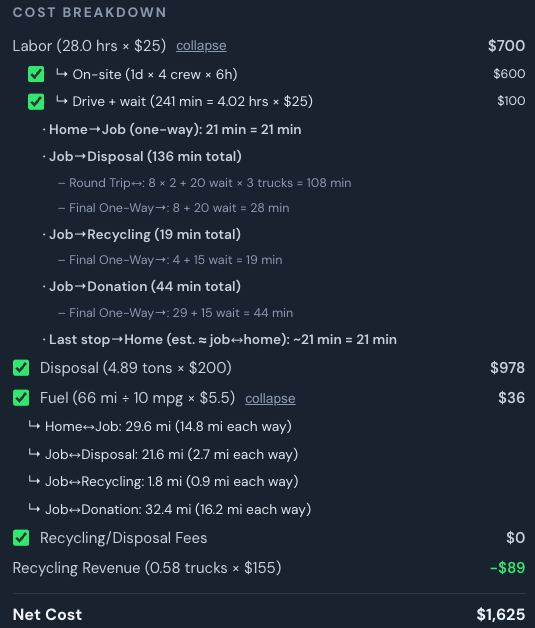
Cost breakdown panel showing labor, disposal, fuel split
[ Screenshot: Cost breakdown โ€” labor / disposal / fuel ]
Your floor, your call

Set a target margin. See instantly if you're above it.

Configure your target gross margin in settings. Every estimate shows where it lands against that target โ€” so owners know at a glance if a quote needs adjustment, before it goes to the customer.
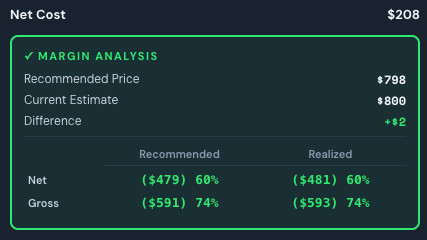
Margin indicator on the estimate screen
[ Screenshot: Margin indicator on the estimate screen ]
๐Ÿ“‰

End the margin surprises

See profit before you commit, not after the job closes.

๐Ÿ—‘๏ธ

Disposal is the hidden killer

Jobs priced without real disposal math bleed margin quietly.

๐Ÿ‘€

One number your whole team trusts

Labor, disposal, and fuel in one line โ€” no reconciliation needed.

Explore more

Works with the rest of the platform.

Know your profit before you commit.

Start a free trial and see the margin on your next estimate.

Free trial for owners & operators. No credit card required.
โ† Back to all features